Charging a Car on Danish Spot Prices — What I Actually Built
Using Energi Data Service in Home Assistant to track hourly spot prices, find the cheapest charging window, and automate Škoda Elroq charging without touching the app.
Last February there was a day where electricity cost 0.18 DKK/kWh at 3am and 3.40 DKK/kWh at 8am. That’s a 19x difference in one night. If your car charges on a fixed overnight schedule, you’re basically rolling dice on which end of that spread you land on.
Home Assistant can see the hourly prices. The rest follows.
Energi Data Service
Energi Data Service is a Danish public utility API — free, no key required. The HA integration pulls today’s and tomorrow’s hourly spot prices for your price area (DK1 or DK2).
Install from HACS, add via Integrations, pick your area. You get:
sensor.energi_data_service — current hour price (DKK/kWh incl. VAT)The raw_today and raw_tomorrow attributes contain the full 24-hour price arrays as {hour, price} objects, where hour is an ISO datetime string. Tomorrow’s prices arrive around 13:00 each day, which is when the Nord Pool auction clears.
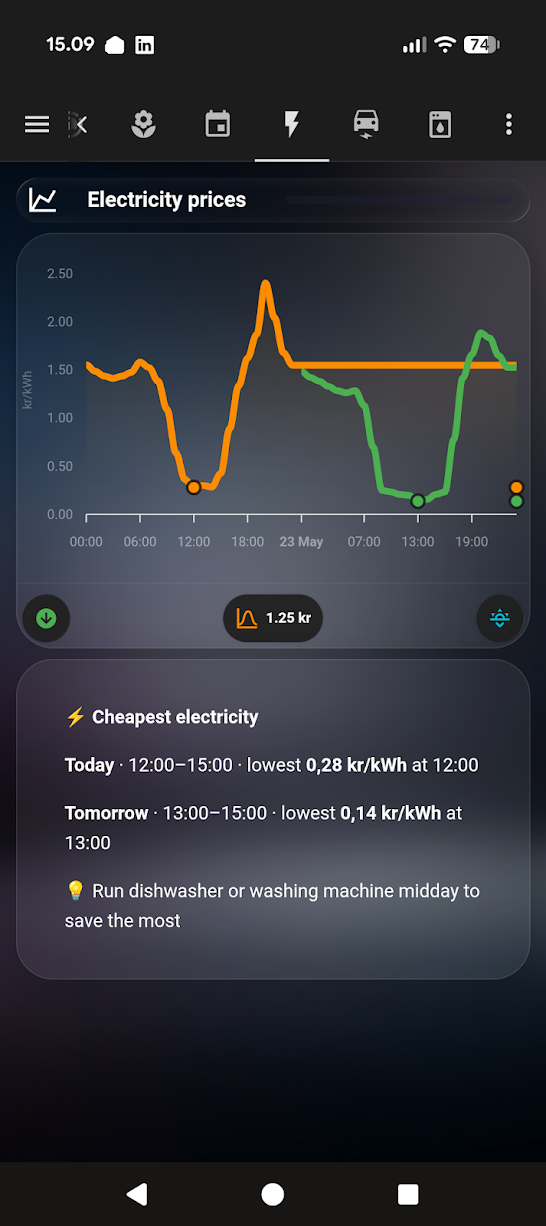
The chart
custom:apexcharts-card (HACS) with a column type is the right call here — each bar holds for a full hour, then steps. I use color thresholds to make the expensive hours obvious at a glance:
type: custom:apexcharts-card
graph_span: 30h
now:
  show: true
  label: Now
series:
  - entity: sensor.energi_data_service
    type: column
    data_generator: |
      return entity.attributes.raw_today
        .concat(entity.attributes.raw_tomorrow || [])
        .map(h => [new Date(h.hour).getTime(), h.price]);
    color_threshold:
      - value: 0
        color: '#4caf50'
      - value: 1.0
        color: '#ff9800'
      - value: 1.5
        color: '#f44336'
Green below 1 DKK, orange up to 1.50, red above. The concat handles the case where tomorrow’s prices haven’t arrived yet — without it the chart breaks silently in the morning.
Finding the cheapest window
As a template sensor
A template sensor that finds the cheapest consecutive 2-hour block remaining today:
template:
  - sensor:
      - name: "Cheapest charge window"
        state: >
          {% set prices = state_attr('sensor.energi_data_service', 'raw_today') %}
          {% if prices %}
            {% set ns = namespace(best_hour=0, best_avg=999) %}
            {% for i in range(prices | length - 1) %}
              {% set avg = (prices[i].price + prices[i+1].price) / 2 %}
              {% if avg < ns.best_avg and as_datetime(prices[i].hour).hour >= now().hour %}
                {% set ns.best_avg = avg %}
                {% set ns.best_hour = as_datetime(prices[i].hour).hour %}
              {% endif %}
            {% endfor %}
            {{ '%02d:00' % ns.best_hour }}
          {% else %}
            unknown
          {% endif %}
This shows up as 02:00 or 14:00 on the dashboard. Not used directly in the charging automation (that runs every hour and decides based on the current price), but useful for sanity-checking whether the car is charging at a reasonable time.
As a dashboard card
If you’d rather skip the template sensor entirely, this markdown card computes and shows the cheapest window directly — including both today and tomorrow once tomorrow’s prices are live:
type: markdown
content: >
  {%- set d=state_attr("sensor.energi_data_service","raw_today") -%}
  {%- set r=state_attr("sensor.energi_data_service","raw_tomorrow") -%}
  {%- set tv=state_attr("sensor.energi_data_service","tomorrow_valid") -%}
  {%- set tm=d|map(attribute="price")|min -%}{%- set th=tm*1.25 -%}
  {%- set t=namespace(mi=0,s=0,e=0) -%}
  {%- for h in d -%}{%- if h.price==tm -%}{%- set t.mi=loop.index0 -%}{%- endif -%}{%- endfor -%}
  {%- set t.s=t.mi -%}{%- set t.e=t.mi -%}
  {%- for i in range(23) -%}{%- if t.s>0 and d[t.s-1].price<=th -%}{%- set t.s=t.s-1 -%}{%- endif -%}{%- endfor -%}
  {%- for i in range(23) -%}{%- if t.e<23 and d[t.e+1].price<=th -%}{%- set t.e=t.e+1 -%}{%- endif -%}{%- endfor -%}
  {%- set ts=t.s -%}{%- set te=t.e+1 -%}{%- set tmi=t.mi -%}
  {%- if tv and r -%}
  {%- set rm=r|map(attribute="price")|min -%}{%- set rh=rm*1.25 -%}
  {%- set n=namespace(mi=0,s=0,e=0) -%}
  {%- for h in r -%}{%- if h.price==rm -%}{%- set n.mi=loop.index0 -%}{%- endif -%}{%- endfor -%}
  {%- set n.s=n.mi -%}{%- set n.e=n.mi -%}
  {%- for i in range(23) -%}{%- if n.s>0 and r[n.s-1].price<=rh -%}{%- set n.s=n.s-1 -%}{%- endif -%}{%- endfor -%}
  {%- for i in range(23) -%}{%- if n.e<23 and r[n.e+1].price<=rh -%}{%- set n.e=n.e+1 -%}{%- endif -%}{%- endfor -%}
  {%- set rs=n.s -%}{%- set re=n.e+1 -%}{%- set rmi=n.mi -%}
  {%- endif -%}
  ⚡ **Cheapest electricity**

  **Today** · {{ "%02d:00"|format(ts) }}–{{ "%02d:00"|format(te) }} · lowest **{{ "%.2f"|format(tm)|replace(".",",") }} kr/kWh** at {{ "%02d:00"|format(tmi) }}
  {%- if tv and r %}

  **Tomorrow** · {{ "%02d:00"|format(rs) }}–{{ "%02d:00"|format(re) }} · lowest **{{ "%.2f"|format(rm)|replace(".",",") }} kr/kWh** at {{ "%02d:00"|format(rmi) }}
  {%- endif %}

  💡 Run dishwasher or washing machine midday to save the most
The logic: find the minimum price for the day, then expand the window to include all adjacent hours within 25% of that minimum. The card re-renders automatically whenever the sensor updates — no separate automation needed.
The charging automation
alias: Elroq — Smart charge
trigger:
  - platform: time_pattern
    minutes: "0"
condition:
  - condition: state
    entity_id: binary_sensor.skoda_elroq_charger_connected
    state: "on"
  - condition: numeric_state
    entity_id: sensor.skoda_elroq_battery_level
    below: 90
action:
  - choose:
      - conditions:
          - condition: numeric_state
            entity_id: sensor.energi_data_service
            below: 1.0
        sequence:
          - service: switch.turn_on
            target:
              entity_id: switch.skoda_elroq_charging
      - conditions:
          - condition: numeric_state
            entity_id: sensor.energi_data_service
            above: 1.5
        sequence:
          - service: switch.turn_off
            target:
              entity_id: switch.skoda_elroq_charging
Below 1.00 DKK — charge. Above 1.50 — stop. Between those two numbers — leave it alone. The dead zone between 1.00 and 1.50 is deliberate: without it the switch would toggle on and off every hour when prices hover around the threshold, which isn’t good for the charger or the car.
There’s a input_boolean.elroq_force_charge override for mornings when I need a full charge regardless of price. The EV entities (switch.skoda_elroq_charging, binary_sensor.skoda_elroq_charger_connected) come from the MySkoda integration (HACS) — authenticate with your Škoda Connect account to get them.
Does it actually save money?
After the first full month: roughly 28% lower charging cost compared to always-on overnight charging. The savings come almost entirely from the nights with large price spreads — there are weeks in Denmark where the spread is tiny and the automation makes no difference at all.
The thing I didn’t expect: it changed how I think about running other appliances. The electricity price chart is now one of the most-checked cards in my dashboard — and I’ve since added the cheapest window card above, which automatically shows the best time to run the dishwasher or washing machine too. That behavioral change probably adds more savings than the automated EV charging does.