A Family Calendar in Home Assistant — Four People, One View
How I combined four Google Calendars plus waste collection into a single colour-coded HA view that replaced the wall calendar we'd had for years.
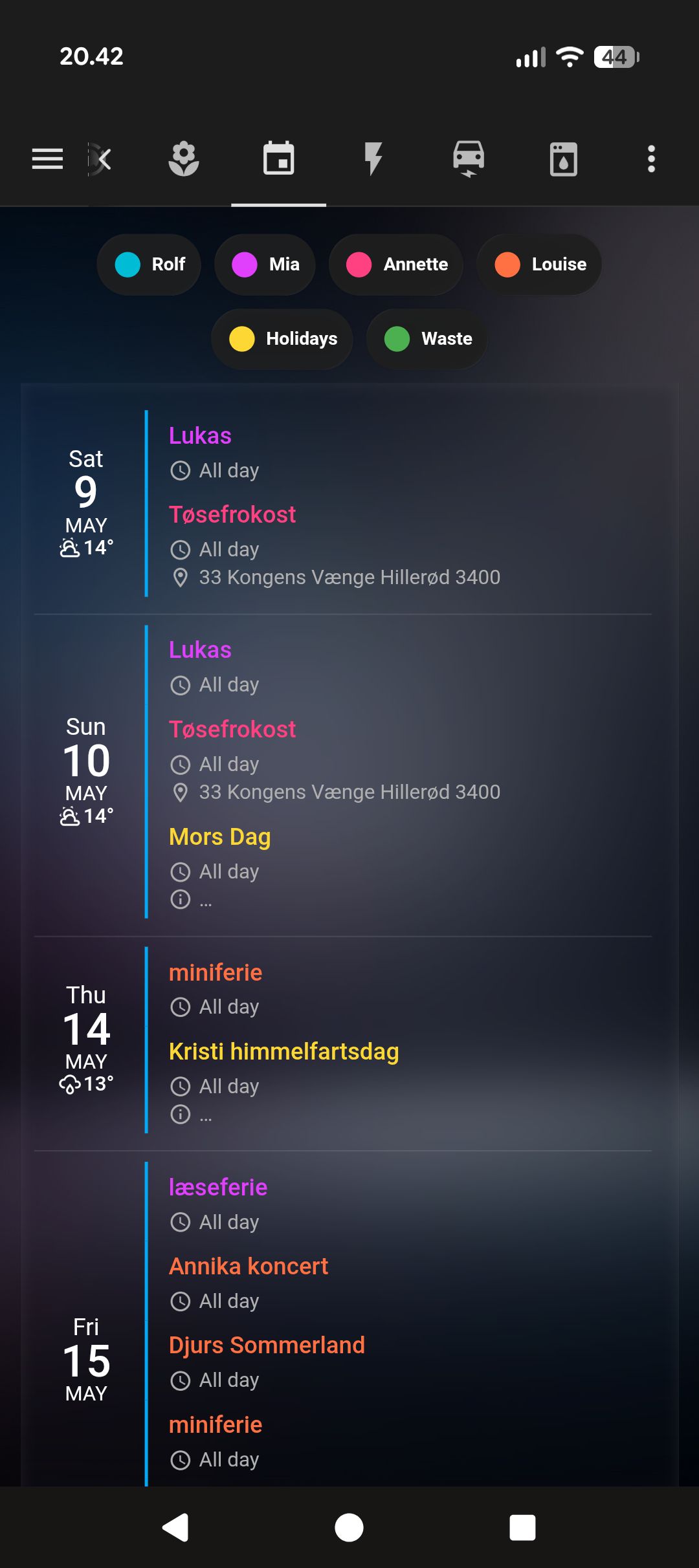
We had a wall calendar in the kitchen for years. One of those big paper ones with a column per family member. Someone would write something in it, someone else wouldn’t see it, and we’d end up with a collision at school pickup or a birthday forgotten until the morning of. The calendar worked fine as long as everyone updated it, which they didn’t, reliably.
The HA calendar view didn’t replace the habit problem. But it put the same information somewhere everyone already looks.
The setup
Each family member has a Google Calendar. HA’s Google Calendar integration pulls all of them in as separate calendar.* entities. Waste collection comes from the affalddk integration (HACS) — a Danish municipal waste API that creates its own calendar entity with pickup dates.
The calendar view uses custom:atomic-calendar-revive (HACS) in agenda mode. Nothing fancy — just a scrollable list of upcoming events, colour-coded by person.
type: custom:atomic-calendar-revive
entities:
  - entity: calendar.rolf
    color: "#4fc3f7"
  - entity: calendar.family_member_1
    color: "#f06292"
  - entity: calendar.family_member_2
    color: "#ff8a65"
  - entity: calendar.family_member_3
    color: "#aed581"
  - entity: calendar.affalddk_bytoften_1
    color: "#78909c"
mode: Event
maxEventCount: 15
hoursFormat: 24h
showWeekDay: true
showRelativeTime: true
showLocation: true
showDescription: false
showRelativeTime: true is the thing that changed how I use it. Instead of “May 14” it says “in 5 days”. I process relative time faster than absolute dates. I don’t know why.
What the waste calendar does
The affalddk integration creates calendar events for each pickup type: general waste, recycling, paper, glass. They show up as grey entries in the view. On the home screen the waste card only appears within three days of a pickup — but here in the dedicated calendar view, you see the full schedule months out.
That sounds minor. It isn’t. Knowing cardboard pickup is next Thursday means I actually break down boxes in time instead of cramming them in the bin the night before.
The colour coding
Each person gets one colour, consistently. It’s the same colour in every context where their events appear. After a few weeks you stop reading the name column and just read the colour. A glance at Monday tells you whose day it is without your eyes needing to focus on text.
The waste calendar is grey because it’s not a person — it’s infrastructure. It sits in the list without competing visually with the human events.
What I didn’t do
I didn’t build a week-grid view. There are calendar cards that render a proper monthly grid, and I tried one. It looked correct but I found myself using it the same way I used the paper wall calendar: not often enough, and only to check a specific date.
The agenda view is what I actually use. It’s just a list of what’s coming, in order. No spatial reasoning required.
The home screen shows the next 3 events from all calendars combined. The dedicated calendar view shows 15. When I want to plan a week out I go to the calendar view. Day-to-day I just look at the home screen. Two levels of zoom off the same data.