Mammotion Flora in Home Assistant — What Actually Works
Mammotion Flora (Luba Mini 2) in Home Assistant: GPS boundary mowing, weather-aware scheduling, and the satellite count quirk nobody warns you about.
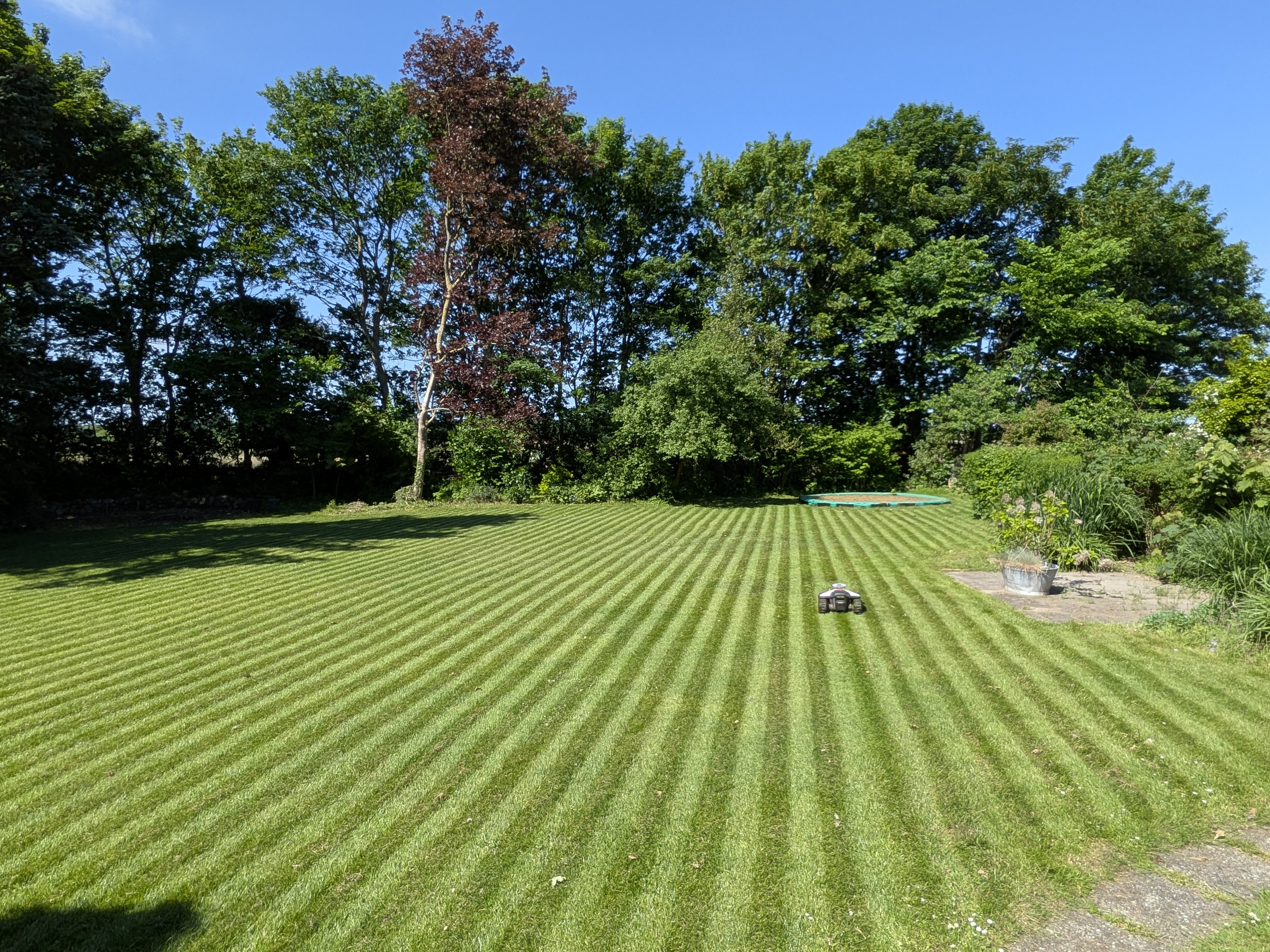
My Husqvarna 213C ran for years and never once talked to Home Assistant. A ride-on mower doesn’t — you climb on, drive it, and that’s the deal. If it rained, I cancelled manually. If I was away, the lawn waited.
That got old fast.
I replaced it with a Mammotion Luba Mini 2 (I named it Flora) about a year ago, mainly because it has a real HA integration. Here’s what I found after a year of running it.
The Setup
The Flora uses GPS + RTK for navigation — no perimeter wire. RTK corrections come from iNav NetRTK over 4G. I dropped the physical RTK base station antenna in the garden in favour of Network RTK, which routes correction data through the mobile network and Mammotion’s cloud. No antenna on the roof, no cable run to the garden. The trade-off is that every position correction makes a round trip over the internet — and that turns out to matter more than you’d expect. More on this in What’s rough.
You draw the boundary in the Mammotion app once, and after that the mower handles it from coordinates. The Vision Module is a small camera on the body that detects obstacles.
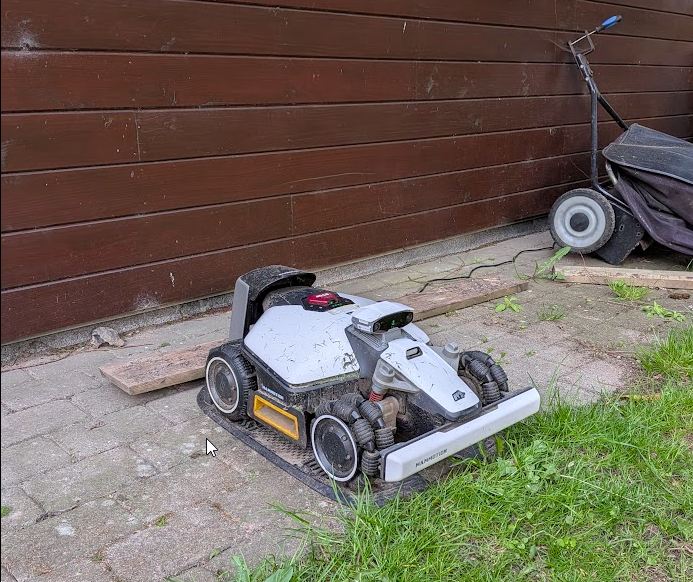
Flora manages the full 1,000 m² on her own. No buried wire, no mapping tape, no plastic stakes marking restricted zones. Draw the boundary once in the app — she handles the rest every session, working her way around the trees, the pond, and whatever ended up on the lawn.
Installing the integration: HACS → search Mammotion → authenticate with your account. After that, you get:
lawn_mower.flora               — start, dock, pause
sensor.flora_battery
sensor.flora_satellites_robot  — this one matters, see below
sensor.flora_wifi_rssi
The lawn_mower domain covers everything you’d want:
service: lawn_mower.start_mow
target:
  entity_id: lawn_mower.flora
The Satellite Count Sensor
sensor.flora_satellites_robot is the most useful entity the integration exposes, and nobody really talks about it.
Below about 10 active satellites, the GPS positioning gets shaky. The mower doesn’t fail — it just hesitates at the boundary edges and occasionally creeps into the hedge. I found this out by watching it wander slightly on overcast mornings and eventually correlating it with low satellite counts.
I added a card_mod color threshold on the chip: green above 12, orange 8–12, red below 8. Now I can see at a glance whether the conditions are good before the scheduled start.
The obvious next step is an automation that delays start by 10 minutes if the count is under 12 at the scheduled time. Haven’t built that yet but it’s on the list.
Replacing the App Scheduler
The Mammotion app scheduler does one thing: run the mower at a fixed time on fixed days. It has no weather awareness and no way to hook into anything else.
I replaced it completely with HA helpers — one input_boolean per weekday, one input_number for the hour:
input_boolean.flora_monday ... flora_sunday
input_number.flora_start_hour   (7–20, step 0.5)
The automation checks every hour on the clock:
alias: Flora — Run on schedule
trigger:
  - platform: time_pattern
    minutes: "0"
condition:
  - condition: template
    value_template: >
      {% set day_map = {
        0: 'monday', 1: 'tuesday', 2: 'wednesday',
        3: 'thursday', 4: 'friday', 5: 'saturday', 6: 'sunday'
      } %}
      {{ is_state('input_boolean.flora_' ~ day_map[now().weekday()], 'on') }}
  - condition: template
    value_template: >
      {{ now().hour == states('input_number.flora_start_hour') | int(0) }}
  - condition: not
    conditions:
      - condition: state
        entity_id: weather.forecast_home
        state: [rainy, pouring, snowy, lightning-rainy]
action:
  - service: lawn_mower.start_mow
    target:
      entity_id: lawn_mower.flora
The dashboard is a row of toggle switches, one per day. My partner can see exactly what the schedule is and change it without opening any app. That alone was worth the migration.
Dashboard
custom:lawn-mower-card (HACS) renders a graphic of the mower with battery level — looks good, minimal config. I put it at the top of the view, with mushroom chips below for the telemetry I actually care about:
- type: custom:mushroom-chips-card
  chips:
    - type: entity
      entity: sensor.flora_battery
      icon: mdi:battery
    - type: entity
      entity: sensor.flora_satellites_robot
      icon: mdi:satellite-variant
    - type: entity
      entity: sensor.flora_wifi_rssi
      icon: mdi:wifi
Vision Module
Hedgehogs are real here. The Vision Module has stopped the mower for them reliably — also for a forgotten football, a garden hose, and once for a shadow from a flagpole at a specific time of day.
That flagpole shadow took me two weeks to figure out. The mower would pause at 16:30 every sunny afternoon, report no obstacle, and resume on its own after a minute. Shadow angle. The module sees contrast patterns, not just physical objects, and at that sun angle the shadow looked like an edge.
Mammotion has improved this in firmware updates. It’s mostly fine now. But “mostly” is doing some work in that sentence.
There’s no HA sensor for obstacle events, which is a genuine gap. I can’t build a notification for “mower stopped 3 times today” without polling the state log manually.
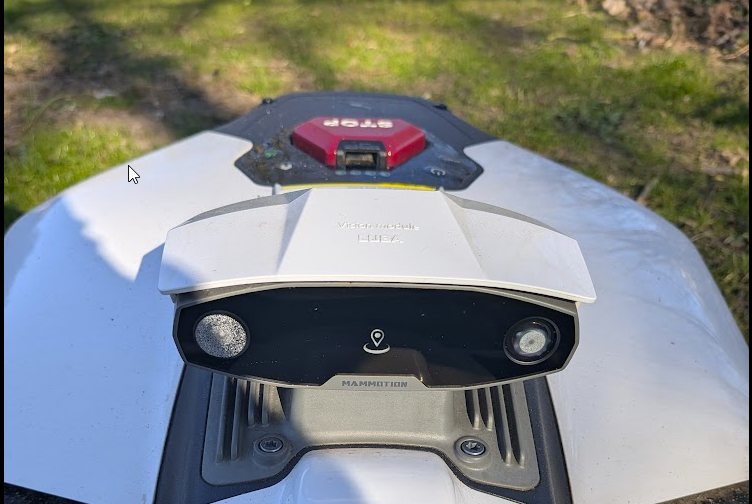
This spring, when I brought Flora out of the workshop after her first winter in storage, the Vision Module had failed. Not gradual degradation — moisture had built up inside one of the camera lenses over winter, visible in the photo above. It stopped detecting anything.
I contacted Mammotion support expecting the standard troubleshooting loop — submit a ticket, send photos, wait, get asked for the same photos again. That’s not what happened. They diagnosed the problem clearly and quickly, communicated professionally at every step, and shipped a replacement unit within a few days, no argument. What stood out was that they followed up after the replacement arrived to check that everything was running correctly. That kind of after-sales contact is rare with hardware brands, and it made a real difference.
The module can fail. Winter storage and condensation are a real combination to watch. But if it does happen, you’re in good hands.
What’s rough
The HA integration has a latency problem. Commands take 30–60 seconds to reflect. I used to assume it was a lazy API. After running Flora on 4G Network RTK for a full season, I think the real explanation is structural: Flora’s entire navigation loop runs through Mammotion’s cloud. Every RTK correction travels over 4G to their servers and back for each position fix. The cloud is already under constant load just keeping her on course — HA status calls have to wait in that queue. The latency isn’t a bug, it’s the architecture.
It’s still annoying on the dashboard. The workaround I use is a small script that calls start_mow and forces an entity refresh five seconds later — enough time for the command to register, fast enough that the dashboard doesn’t sit there looking wrong:
alias: Flora — Start and refresh
sequence:
  - service: lawn_mower.start_mow
    target:
      entity_id: lawn_mower.flora
  - delay:
      seconds: 5
  - service: homeassistant.update_entity
    target:
      entity_id: lawn_mower.flora
The “Robot out of task area” error is still happening periodically, always near the no-go zones around the flower beds. My original theory was pure multipath — GPS signals bouncing off the raised beds. After a full season watching it, I think it’s a combination: multipath creates a momentary position ambiguity, and 4G latency prevents the RTK correction from arriving fast enough to resolve it. When the signal bounces off a raised bed, Flora needs an immediate correction to confirm she’s inside the boundary. If the mobile network has a micro-dip in ping at that exact moment, the correction doesn’t arrive in time and she stops. Two problems hitting at once, each making the other worse.
The real gap is that there’s no error code sensor in the integration. No push notification when she’s been sitting stuck in the garden for 20 minutes — I have to open the Mammotion app to find out anything went wrong. Until that sensor exists, I run this automation:
alias: Flora — Stuck paused alert
trigger:
  - platform: state
    entity_id: lawn_mower.flora
    to: "paused"
    for:
      minutes: 10
action:
  - service: notify.mobile_app
    data:
      title: "Flora has stopped"
      message: "Flora has been paused for 10 minutes — check the garden."
Blunt, but it works. She’s either stuck or done early, and either way I want to know.
Initial boundary setup requires the Mammotion app and a Mammotion cloud account — there’s no way around that. The GPS boundary data lives in their cloud and the app is the only interface to draw it. Once set up, you never need the app again. But you do need it that first time.
Overall: worth it, and then some. Flora is more internet-reliant than any garden tool I’ve owned — the 4G dependency runs deeper than it first appears — but I’m genuinely thrilled with her. She’s part of how the house runs now, and that’s hard to give up once you’ve had it.