Tado + card_mod — Making a Heating Dashboard Worth Looking At
5 Tado zones in Home Assistant with mushroom climate cards, a CSS breathing animation for active heating, and presence setback that works.
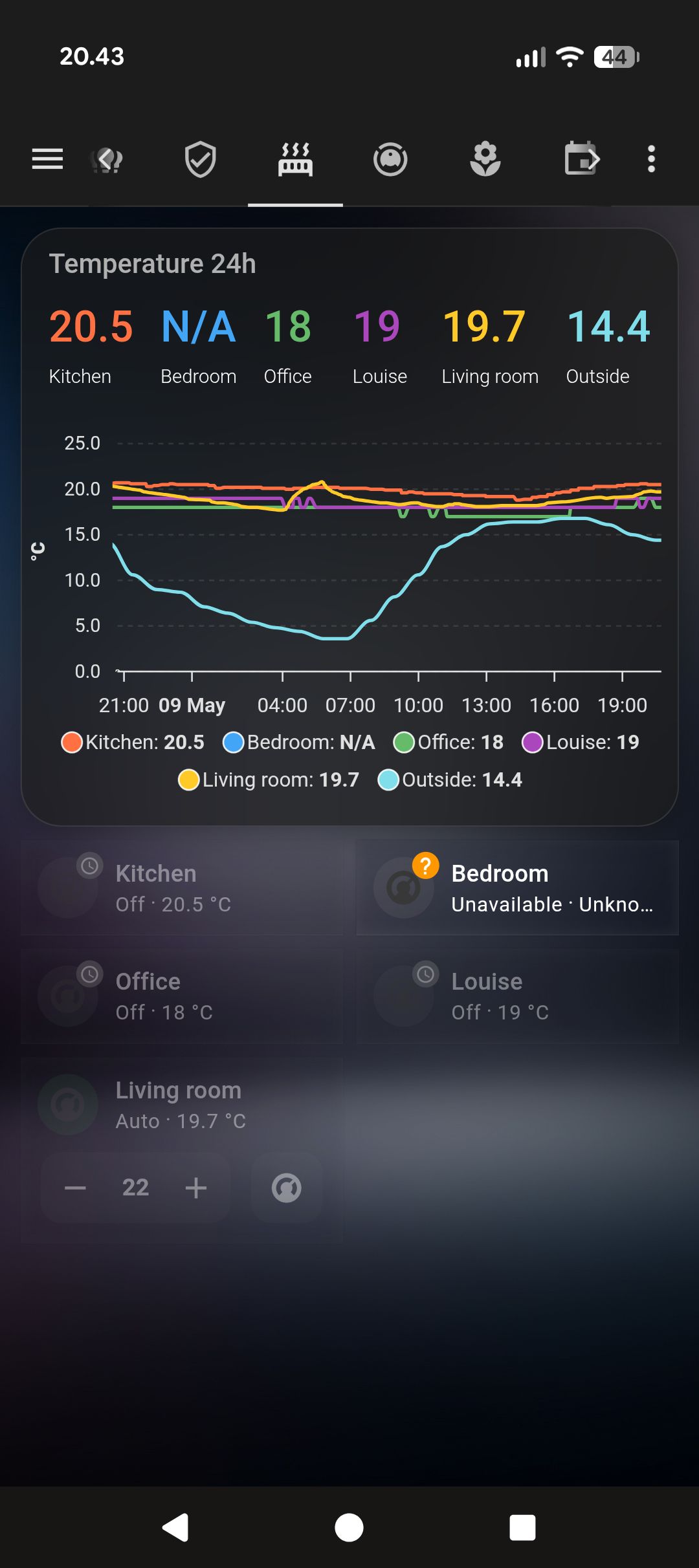
Tado’s HA integration is one of the best out of the box — built into HA, no HACS needed. You need the Tado Internet Bridge hardware and a Tado account. Add the integration, sign in, and all your zones appear as climate.* entities with full support. State updates come back in under five seconds. It just works.
So the heating part was easy. The interesting part was making the dashboard tell you something at a glance.
The breathing animation
The problem with displaying 5 climate cards in a grid: they all look identical whether the heating is running or not. Temperature displayed, setpoint displayed, mode displayed. But you can’t tell which zones are actively firing the boiler.
I added a CSS keyframe animation via card_mod that applies only when the hvac_action attribute is heating:
type: custom:mushroom-climate-card
entity: climate.zone_living_room
card_mod:
  style: |
    :host {
      {% if state_attr('climate.zone_living_room', 'hvac_action') == 'heating' %}
      animation: breathe 3s ease-in-out infinite;
      {% endif %}
    }
    @keyframes breathe {
      0%, 100% { filter: drop-shadow(0 0 4px rgba(255, 100, 0, 0.3)); }
      50%       { filter: drop-shadow(0 0 14px rgba(255, 100, 0, 0.75)); }
    }
Active zones pulse with a warm orange glow. Idle zones are static. Across a 5-zone grid it’s immediately obvious which rooms are actually consuming energy — something no static dashboard had given me before.
A visitor asked if the house was breathing. That felt right.
Duplicate the block for each zone and swap the entity ID. The Jinja2 inside card_mod evaluates at render time, so each card independently decides whether to animate.
Layout
Five cards in a 2-column grid via custom:layout-card (HACS), wrapped in a glass custom:stack-in-card (HACS), with card_mod (HACS) for the CSS animations:
type: custom:stack-in-card
card_mod:
  style: |
    ha-card {
      background: rgba(255,255,255,0.05) !important;
      backdrop-filter: blur(15px) !important;
      border: 1px solid rgba(255,255,255,0.10) !important;
      box-shadow: 0 8px 32px rgba(0,0,0,0.3) !important;
      border-radius: 28px !important;
    }
    ha-card::before { display: none !important; }
cards:
  - type: custom:layout-card
    layout_type: custom:grid-layout
    layout:
      grid-template-columns: 1fr 1fr
      grid-gap: 8px
      padding: 8px
    cards:
      - type: custom:mushroom-climate-card
        entity: climate.zone_living_room
        show_temperature_control: true
        card_mod:
          style: |
            :host {
              {% if state_attr('climate.zone_living_room', 'hvac_action') == 'heating' %}
              animation: breathe 3s ease-in-out infinite;
              {% endif %}
            }
            @keyframes breathe {
              0%, 100% { filter: drop-shadow(0 0 4px rgba(255,100,0,0.3)); }
              50%       { filter: drop-shadow(0 0 14px rgba(255,100,0,0.75)); }
            }
      # repeat for each zone
show_temperature_control: true adds +/- buttons directly on the card. Small thing, but it means adjusting a zone doesn’t require navigating anywhere.
Presence-based setback
When everyone leaves, drop everything to 17°C. When someone returns, restore auto mode (Tado’s own schedule takes over):
alias: Tado — Away setback
trigger:
  - platform: state
    entity_id: group.household_members
    to: not_home
action:
  - repeat:
      for_each:
        - climate.zone_living_room
        - climate.zone_office
        - climate.zone_bedroom
        - climate.zone_bathroom
        - climate.zone_hallway
      sequence:
        - service: climate.set_temperature
          target:
            entity_id: "{{ repeat.item }}"
          data:
            temperature: 17

alias: Tado — Restore on return
trigger:
  - platform: state
    entity_id: group.household_members
    to: home
action:
  - repeat:
      for_each: [climate.zone_living_room, climate.zone_office, climate.zone_bedroom,
                 climate.zone_bathroom, climate.zone_hallway]
      sequence:
        - service: climate.set_hvac_mode
          target:
            entity_id: "{{ repeat.item }}"
          data:
            hvac_mode: auto
I use this instead of Tado’s built-in geofencing because my presence detection combines phone GPS, UniFi device tracking, and a person.* entity — it’s more reliable than Tado’s app alone, which occasionally decides I’ve left when I’m just in the back garden.
Window detection
Tado’s open window detection is hardware-based — the TRV measures a sudden temperature drop and pauses heating automatically. HA exposes this as binary_sensor.zone_*_window.
I added a notification for windows left open more than 20 minutes during active heating. The bathroom window is the usual culprit. The automation has probably saved more in heating costs than anything else I’ve built around Tado.
alias: Tado — Open window alert
trigger:
  - platform: state
    entity_id:
      - binary_sensor.zone_living_room_window
      - binary_sensor.zone_bathroom_window
    to: "on"
    for:
      minutes: 20
condition:
  - condition: template
    value_template: >
      {{ state_attr(trigger.entity_id | replace('binary_sensor.', 'climate.') | replace('_window', ''), 'hvac_action') == 'heating' }}
action:
  - service: notify.all_devices
    data:
      title: "Window open — heating running"
      message: >
        {{ trigger.entity_id
           | replace('binary_sensor.zone_','')
           | replace('_window','')
           | replace('_',' ')
           | title }} has been open for 20 minutes.