The Home Assistant Home Screen That Only Shows What Matters
An HA home screen where every card earns its place: conditional cards, a priority alert ticker, and a Škoda section that follows the charger state.
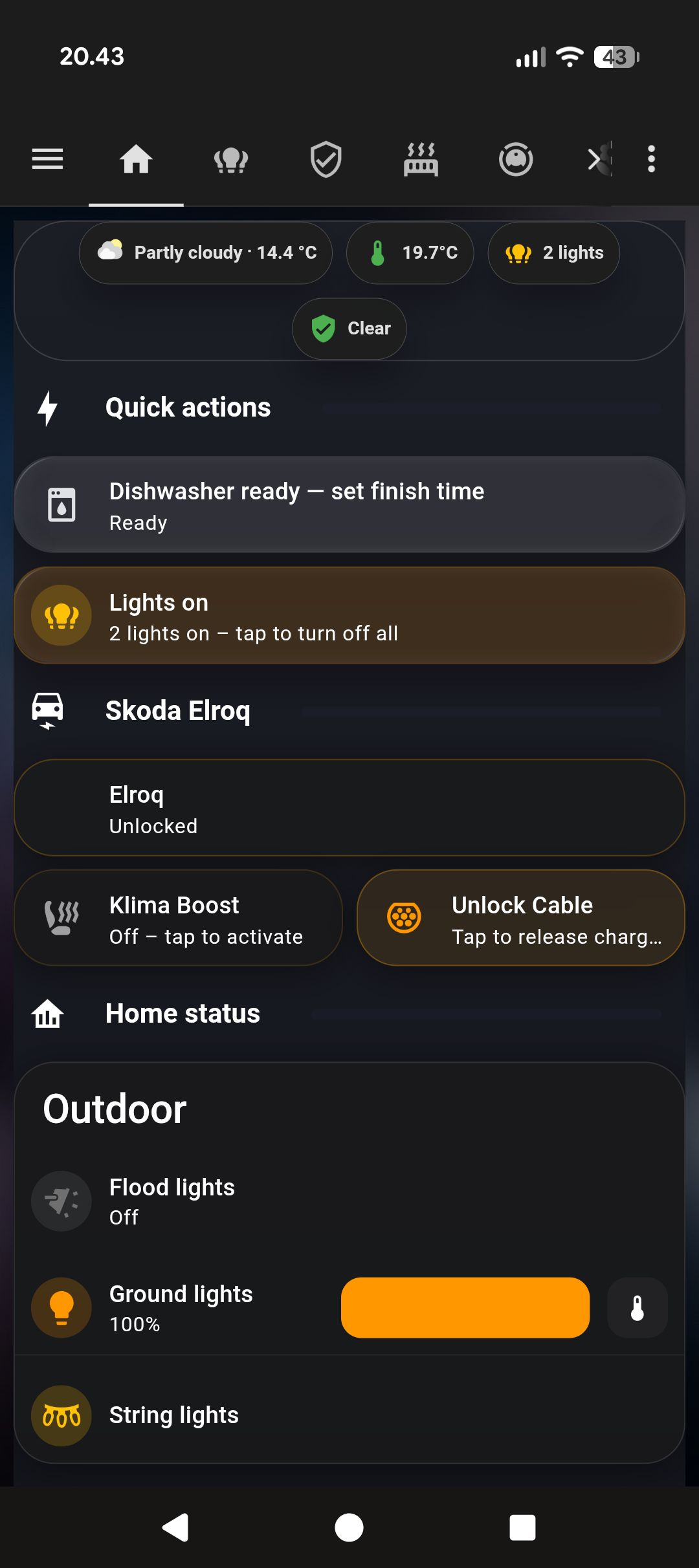
My first HA home screen had 40-something cards. Every time I opened it I’d scan past the docked vacuum, the off lights, the locked car, the zero-activity motion sensor. None of that is information. It’s just confirmation that nothing unusual happened. Noise dressed up as data.
I started removing everything that was only saying “still fine.”
The screenshot above is from this morning. The dishwasher is running (blue card). The car charger is connected, so “Unlock Cable” is sitting next to “Klima Boost”. Home status is empty — no lights on, no robots moving. Energy says cheapest now. That’s it. Four active things, shown. Everything else, hidden.
The alert ticker
At the very top sits a custom:alert-ticker-card (HACS) with show_when_clear: false. When nothing needs attention, it doesn’t exist. When something does, it rotates through alerts in priority order:
type: custom:alert-ticker-card
show_when_clear: false
cycle_interval: 6
cycle_animation: fade
alerts:
  - entity: binary_sensor.sentinel_person
    state: "on"
    message: "👤 Person detected at Sentinel"
    theme: warning
    priority: 1
    tap_action:
      action: navigate
      navigation_path: /nyt-mobil/overvagning
  - entity: sensor.affalddk_bytoften_1_naeste_afhentning
    operator: "=="
    state: "1"
    message: "🗑️ Waste collected tomorrow"
    theme: warning
    priority: 3
  - entity: lawn_mower.flora
    state: error
    message: "⚠️ Flora error"
    theme: emergency
    priority: 1
Person detection is priority 1. Waste tomorrow is priority 3. They cycle every 6 seconds. The ticker tapping on a person alert navigates directly to the security view. When everything is fine the space is just gone — no “All clear” message, no empty bar. Nothing.
The dishwasher has three states
This took a while to get right. The dishwasher card has three completely different behaviours depending on state:
Hidden — when the machine is off or finished. No card, no section.
Ready — when OperationState is Ready AND remote start is allowed. Shows a tile with “Dishwasher ready — set finish time” that links to the appliances view. The idea: you’ve loaded it, you haven’t started it yet, you want to set a delayed start. The card only appears in that exact window.
Running — when OperationState is Run. Different card, blue tinted background, “Dishwasher running” label. No action needed, just awareness.
- type: conditional
  conditions:
    - entity: sensor.dishwasher_operation_state
      state: BSH.Common.EnumType.OperationState.Run
  card:
    type: tile
    entity: sensor.dishwasher_operation_state
    name: Dishwasher running
    card_mod:
      style: >
        ha-card { background: rgba(30,136,229,0.15) !important;
        border: 1px solid rgba(30,136,229,0.3) !important; }
Three states, three different cards, zero redundancy.
Lights — two tiers, one principle
Lights follow a two-layer pattern. Both layers are conditional on something being on.
Layer 1 — Quick Actions: When any light is on, an amber card appears at the top with the count and a single tap to kill everything. These use custom:mushroom-template-card (HACS, Mushroom suite) with card_mod (HACS) for the tinted backgrounds:
- type: conditional
  conditions:
    - condition: or
      conditions:
        - condition: state
          entity: light.ceiling_1
          state: "on"
        - condition: state
          entity: light.smart_flood_lights
          state: "on"
        # ... all lights
  card:
    type: custom:mushroom-template-card
    primary: Lights on
    secondary: >
      {% set l = ['light.ceiling_1','light.ceiling_2','light.corner',
                  'light.flood_lights','light.ground_lights']
         | select('is_state','on') | list | count %}
      {% set c = 1 if is_state('switch.string_lights','on') else 0 %}
      {{ l + c }} lights on – tap to turn off all
    icon: mdi:lightbulb-group
    icon_color: amber
    tap_action:
      action: perform-action
      perform_action: homeassistant.turn_off
      target:
        entity_id:
          - light.ceiling_1
          - light.ceiling_2
          - light.corner
          - light.flood_lights
          - light.ground_lights
          - switch.string_lights
    card_mod:
      style: >
        ha-card { background: rgba(255,152,0,0.10) !important;
        border: 1px solid rgba(255,152,0,0.25) !important; }
One tap. No navigation, no confirmation, all off. This is the card I use 90% of the time.
Layer 2 — Home Status: When indoor lights specifically are on, the individual mushroom light cards appear further down — with full brightness sliders and colour temperature controls. Not just on/off. If you’ve left the lights on and you’re standing in the room wanting to dim them, the controls are right there without navigating away.
The outdoor lights section works the same way but triggers on sunset OR any outdoor light being on. At noon: invisible. At 21:30: there with individual controls for flood lights, ground lights, and string lights.
The two layers serve different needs. Quick Actions is for “I’m leaving, kill everything.” Home Status is for “I’m here and want to adjust.” Same conditional logic, different depth of control.
The Škoda section changes based on context
The car is always shown — lock status, whether it’s home. But what sits below it depends on whether the charger is connected.
Charger not connected: one card — “Klima Boost”. Pre-condition the car before you leave, one tap.
Charger connected: two cards side by side — “Klima Boost” and “Unlock Cable”. When the cable is physically locked in, you need a way to release it. That button only makes sense when the car is charging. So it only appears then.
- type: conditional
  conditions:
    - condition: state
      entity: binary_sensor.skoda_elroq_charger_connected
      state: "on"
  card:
    type: horizontal-stack
    cards:
      - type: custom:mushroom-template-card
        primary: Klima Boost
        # ...
      - type: custom:mushroom-template-card
        primary: Unlock Cable
        secondary: Tap to release charger cable
        icon_color: orange
        # ...
This is the pattern I ended up using everywhere: don’t show controls that aren’t relevant to the current state of the device.
Home status — the section that earns its own content
The home status section contains several conditional cards. All of them need to be active before they appear:
- Living room lights — only visible when at least one indoor light is on. When it appears, it shows full mushroom light cards with dimmer sliders, not just on/off. You’re already there because something is on, so give full control.
- Outdoor section — appears when the sun is below the horizon OR any outdoor light is on. At noon on a clear day: gone. At 21:30 or if someone turned on the flood lights: there.
- Roborock — only when not docked and not idle. Cleaning, returning, paused, error — show it. Sitting in its dock: irrelevant.
- Flora — same logic. Mowing or returning: show status and tap to the mower view. Parked: nothing.
The result: on a typical quiet afternoon, home status has no cards at all. Just the section header. When I come home at 22:00 and the outdoor lights are still on, that section is there with one-tap off buttons.
The length of the screen is the signal
This is the thing I didn’t expect. After a few weeks I realised I was reading the screen length before I read the content. Short screen: quiet day, nothing needs attention. Long screen: something is going on — scroll to find out what.
The waste collection card only appears within 3 days of pickup. Most of the year, not there. The week before collection it shows with color-coded countdown: amber at 3 days, orange at 2, red at 1. I haven’t forgotten to put the bins out since I set this up.
The energy card is always there — current price and when the next cheap window is. That one earned permanent status because it actually changes what I do. I time the dishwasher and dryer off it.
What never shows up
Nothing for “everything is fine”. No card that says the car is home and locked. No card that says no motion detected. No confirmation that the robot is docked. Those aren’t things you need to be told. The absence of a card tells you that.
That’s the part that took longest to trust. When the screen is short, the instinct is to wonder if something broke. It didn’t. Short means quiet.