Bathroom Fan Monitoring in Home Assistant: XIAO ESP32-C3 Bluetooth Proxy + Fresh Intellivent Sky
Setting up a XIAO ESP32-C3 as a Home Assistant Bluetooth proxy, adding Fresh Intellivent Sky fans over BLE, and a crash that looked like bad range but wasn't.

Two Fresh Intellivent Sky bathroom fans, both broadcasting Bluetooth Low Energy, both further from the Home Assistant host than its onboard radio reliably reaches. The fix wasn’t a new HA server or a mesh of repeaters — it was a $5 microcontroller and about ten minutes with a browser. This post covers the Bluetooth proxy setup, adding the fans, and a bug that looked exactly like a hardware problem and wasn’t.
The hardware: Seeed Studio XIAO ESP32-C3
The XIAO ESP32-C3 is a thumbnail-sized board — WiFi, Bluetooth 5, and a USB-C port, nothing else you need to think about. I plugged it into a USB power brick in the hallway between the two bathrooms and never touched the wiring again.
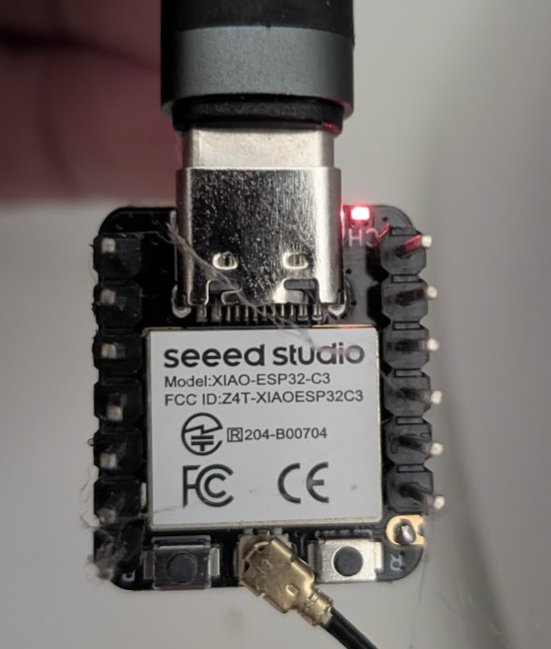
Flashing it is not a project in the way “flashing firmware” usually implies. ESPHome’s web-based project installer has a ready-made Bluetooth Proxy firmware image — plug the board into your computer over USB, open the installer in Chrome or Edge, pick the board and the Bluetooth Proxy project, and it flashes over WebSerial. No YAML to write, no ESPHome dashboard to run locally. Connect it to WiFi during the guided setup and it shows up in Home Assistant’s discovery within a minute.
Once it’s added as an ESPHome device, it registers itself as a Bluetooth adapter under Settings → Devices & Services → Bluetooth. Home Assistant automatically prefers proxies over its own onboard adapter for any device closer to a proxy, with no configuration on your end.
Why a proxy instead of just more range
Home Assistant’s host Bluetooth radio covers roughly one room, maybe two with clear line of sight. Everything past that is a dead zone for any BLE-only integration — no Zigbee-style mesh, no repeater logic, just “in range” or “not in range.” A single $5 ESP32 board fixes an entire dead zone at once, and you can drop more of them anywhere you have USB power; each one just adds coverage, no pairing or per-device configuration required on the proxy side.
I run this alongside a Google Find My setup that also depends on Bluetooth — the FAQ there specifically calls out an ESP32 BLE proxy as the right tool when you need a reading in seconds rather than “whenever a phone walks past.”
Adding the Fresh Intellivent Sky fans
Fresh’s Intellivent Sky is a humidity-sensing bathroom extractor fan with its own Bluetooth interface, controlled normally through the Fresh SmartLink app. Home Assistant has no official integration for it — the one that works is a community project, angoyd/freshintelliventHacs, installed via HACS as a custom repository.
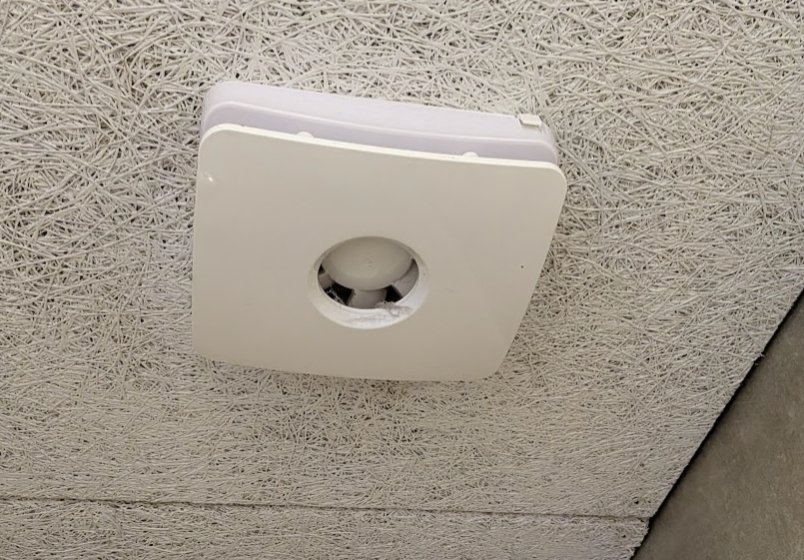
With the proxy in place, setup is genuinely just discovery: once the fan’s BLE advertisements reach a proxy in range, Home Assistant offers it under Settings → Devices & Services → Discovered with fresh_intellivent_sky as the source. Confirm it, and it creates a device with five sensors:
sensor.<name>_humiditysensor.<name>_temperaturesensor.<name>_current_speedsensor.<name>_mode(human-readable — Off, Trickle, Boost, etc.)sensor.<name>_mode_raw(the numeric code behind it)
That’s read-only. There’s no fan.*, switch.*, or select.* entity — nothing in Home Assistant can change the fan’s speed or trigger a boost. Automations built on this integration can notify you to go boost the fan manually; they can’t do it for you. That’s a real limitation worth knowing before you plan automations around it.
Humidity automations that actually work with read-only data
Two fans, five sensors each, no control — but humidity and its rate of change are still enough to build something useful. The pattern I landed on:
- A Derivative Helper (Settings → Devices & Services → Helpers, no YAML) on each humidity sensor, giving a %/min value — a sustained rise past roughly 3.3%/min flags “someone’s in the shower” faster than a fixed humidity threshold ever could.
- A sustained-threshold automation for genuine mold risk: humidity above 70% for 45+ minutes, independent of rate.
Both just push a notification — see the read-only limitation above — but the rate-of-change trigger catches a shower starting within a couple of minutes, well before a fixed “humidity above 65%” threshold would fire.
The bug that looked like a range problem
A few days after setup, one fan’s five sensors all went unavailable while the other kept reporting normally. The obvious assumption is signal — proxy placement, BLE range, maybe the fan needs re-pairing. I checked the proxy’s coverage first and found nothing wrong with it.
The actual cause was in the integration’s config entry, not the radio. Home Assistant tracks each integration instance’s setup state — one of the possible values is failed_unload, which occurs when an integration’s own reload/unload handler throws mid-teardown. In practice it doesn’t self-recover: only a full restart clears it. The error log showed exactly that: an options-update listener triggered a reload, the unload half failed, and the entry was left dead. The identical, unaffected fan’s config entry, by contrast, sat at a normal loaded state the entire time.
Nothing about this is diagnosable from entity state alone — unavailable looks identical whether the cause is “integration crashed” or “device is out of range.” The tell is in Settings → Devices & Services, on the integration entry itself, or in the Home Assistant log around the time the entity went stale. A full restart cleared the stuck entry immediately; every sensor was reporting again within two minutes.
alias: "Bathroom: Fan Sensor Stale Alert"
description: >
  Notifies if a bathroom fan's sensors go and stay unavailable for over an
  hour — includes a one-tap Restart HA action button rather than
  restarting automatically, since staleness can also mean the fan is
  genuinely out of range or powered off, where a restart wouldn't help.
mode: parallel
trigger:
  - platform: state
    entity_id: sensor.example_fan_mode
    to: "unavailable"
    for:
      hours: 1
action:
  - action: notify.mobile_app_pixel_10
    data:
      title: "📡 Fan sensor offline"
      message: "Unavailable for over an hour — likely a crashed integration entry, not range."
      data:
        actions:
          - action: restart_ha_bathroom_fan
            title: "Restart HA"
The action button fires a second, tiny automation that listens for that specific mobile_app_notification_action event and calls homeassistant.restart — deliberately not automatic, since a genuinely out-of-range fan would just get a useless restart on a loop instead of the actual fix.
Styling it into the dashboard
Both fans’ cards use the same frosted-glass card_mod constants as the rest of the dashboard — a humidity trend chart, temperature/mode/speed tiles, and a compact status tile that only renders when the fan is active or humidity is climbing, so an idle bathroom doesn’t take up permanent dashboard space. The formerly-broken fan’s card also carries a small “Connectivity: Unavailable” fallback tile, driven by the same mode sensor going unavailable — it’s gone the moment the sensors start reporting again, no manual dashboard edit needed either way.
One thing to know
If you’re extending Home Assistant’s Bluetooth range for anything other than a single device — Govee sensors, other BLE trackers, more of these fans — the proxy itself doesn’t care what it’s proxying. One XIAO ESP32-C3 per dead zone covers everything in range, not just the device you set it up for. It’s the same logic as running a LoRa gateway for a mailbox sensor 200 metres out — cheap, purpose-built radio hardware solves range problems that no amount of Home Assistant configuration can.