Camera Notifications That Actually Tell You Something
How I got the Sentinel camera to send useful, actionable alerts instead of 40 motion pings a day — one automation, a mute toggle, and action buttons.
For about two weeks after installing the Sentinel camera, I had motion notifications turned on. Every notification said “Motion detected.” Birds, shadows, a plastic bag blowing past the lens at 3am. I turned them all off and left the camera sitting there doing nothing useful for another month.
The fix was simpler than I expected: trigger on person and vehicle only — not raw motion — and give the notification three buttons that actually do something.
What the integration gives you
After adding the camera, HA creates a set of binary sensors from the onboard detection:
binary_sensor.sentinel_motion
binary_sensor.sentinel_person
binary_sensor.sentinel_animal
binary_sensor.sentinel_vehicle
Person and vehicle come from the camera’s own AI chip. Reasonably accurate — better than pure motion, not perfect. The animal sensor has caught actual foxes and, memorably, a large plastic bag moving in a way that apparently seemed alive.
One automation for both triggers
Person and vehicle events go through a single automation in single mode. The mode handles deduplication — if the sensor fires again while the automation is still running (which includes a 60-second cooldown delay at the end), the trigger is discarded silently.
alias: Sentinel — Camera & Notification
mode: single
max_exceeded: silent
trigger:
  - platform: state
    entity_id: binary_sensor.sentinel_person
    from: "off"
    to: "on"
    id: person
  - platform: state
    entity_id: binary_sensor.sentinel_vehicle
    from: "off"
    to: "on"
    id: vehicle
condition:
  - condition: state
    entity_id: input_boolean.sentinel_notifikation_lydlos
    state: "off"
action:
  - variables:
      notif_title: "{{ '\U0001F697 Vehicle at the driveway' if trigger.id == 'vehicle' else '\U0001F464 Person at the driveway' }}"
      notif_message: "{{ 'Sentinel detected a vehicle' if trigger.id == 'vehicle' else 'Sentinel detected a person' }}"
  - action: camera.snapshot
    target:
      entity_id: camera.sentinel_fluent
    data:
      filename: /config/www/sentinel_latest.jpg
  - action: notify.alle_enheder
    data:
      title: "{{ notif_title }}"
      message: "{{ notif_message }}"
      data:
        ttl: 0
        priority: high
        channel: Security
        tag: sentinel_alert
        entity_id: camera.sentinel_fluent
        camera_stream: true
        image: /api/camera_proxy/camera.sentinel_fluent
        actions:
          - action: URI
            title: View Camera
            uri: homeassistant://navigate/nyt-mobil/overvagning
          - action: sentinel_flood_on
            title: Turn on Flood
          - action: sentinel_mute_30
            title: Mute 30 min
        clickAction: /nyt-mobil/overvagning
  - delay:
      seconds: 60
The camera.snapshot call saves a fresh still to /local/sentinel_latest.jpg before the notification fires. The notification itself carries a live camera stream (camera_stream: true) — on Android with the HA companion app this expands to a live feed directly in the notification.
The mute toggle
The only condition is input_boolean.sentinel_notifikation_lydlos (notification mute) being off. That’s the sole gate. It’s simpler than an armed_away condition — no alarm panel required, it works regardless of home or away state, and the notification itself can flip it via the Mute button.
A separate automation resets it to off at midnight each night, so I never have to remember to turn it back on.
Action buttons
The notification carries three buttons:
- View Camera — deep-links to the Security view in the HA companion app
- Turn on Flood — triggers
light.sentinel_floodlightvia a separate automation listening for thesentinel_flood_onmobile action event - Mute 30 min — turns on the mute toggle for 30 minutes, then resets it
Handling the mute action:
alias: Sentinel — Mute 30 min
trigger:
  - platform: event
    event_type: mobile_app_notification_action
    event_data:
      action: sentinel_mute_30
action:
  - action: input_boolean.turn_on
    target:
      entity_id: input_boolean.sentinel_notifikation_lydlos
  - delay:
      minutes: 30
  - action: input_boolean.turn_off
    target:
      entity_id: input_boolean.sentinel_notifikation_lydlos
Fire TV notification
The same automation also pushes to the TV in the living room:
  - action: notify.android_tv_fire_tv_192_168_1_40
    data:
      message: "{{ '\U0001F697 Vehicle detected at the driveway' if trigger.id == 'vehicle' else '\U0001F464 Person detected outside' }}"
      data:
        image: "http://192.168.1.171:8123/local/sentinel_latest.jpg?t={{ now().timestamp() | int }}"
        interrupt: 1
The ?t= timestamp parameter forces a fresh image load — without it the Fire TV shows a cached still from the previous event. interrupt: 1 makes it pop up even during playback.
The dashboard
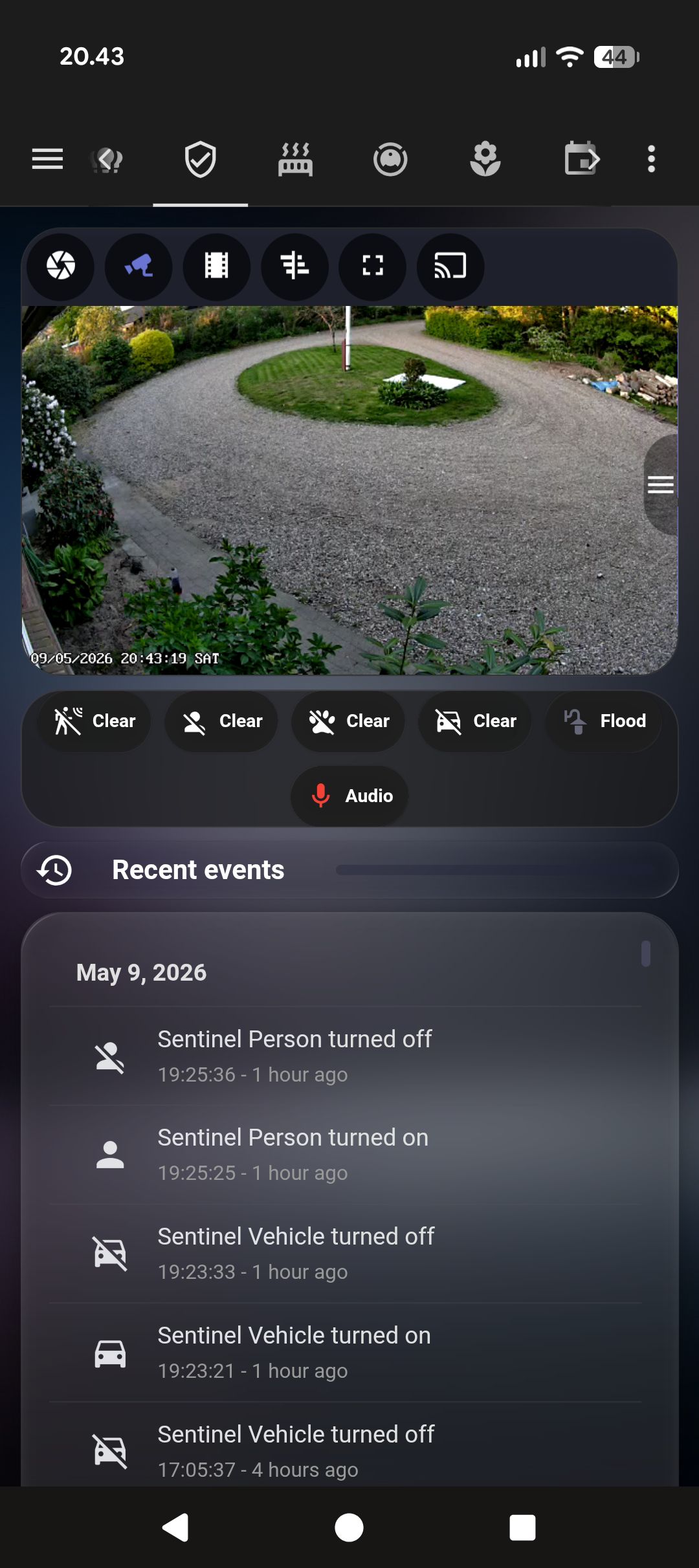
The Security view shows status chips and a 24-hour logbook:
type: vertical-stack
cards:
  - type: custom:mushroom-chips-card
    chips:
      - type: entity
        entity: binary_sensor.sentinel_person
        icon: mdi:account
        icon_color: red
      - type: entity
        entity: binary_sensor.sentinel_vehicle
        icon: mdi:car
      - type: entity
        entity: input_boolean.sentinel_notifikation_lydlos
        icon: mdi:bell-off
        tap_action:
          action: toggle
  - type: logbook
    entities:
      - binary_sensor.sentinel_person
      - binary_sensor.sentinel_vehicle
    hours_to_show: 24
The logbook is what I actually use most after a trip away — scroll through 24 hours of events in one pass rather than replaying push notifications one by one.