TV Auto-Pause When the Phone Rings — Regular Calls and Messenger
One automation pauses the TV the moment either phone rings — regular calls resume automatically, Messenger video calls get a notification button.
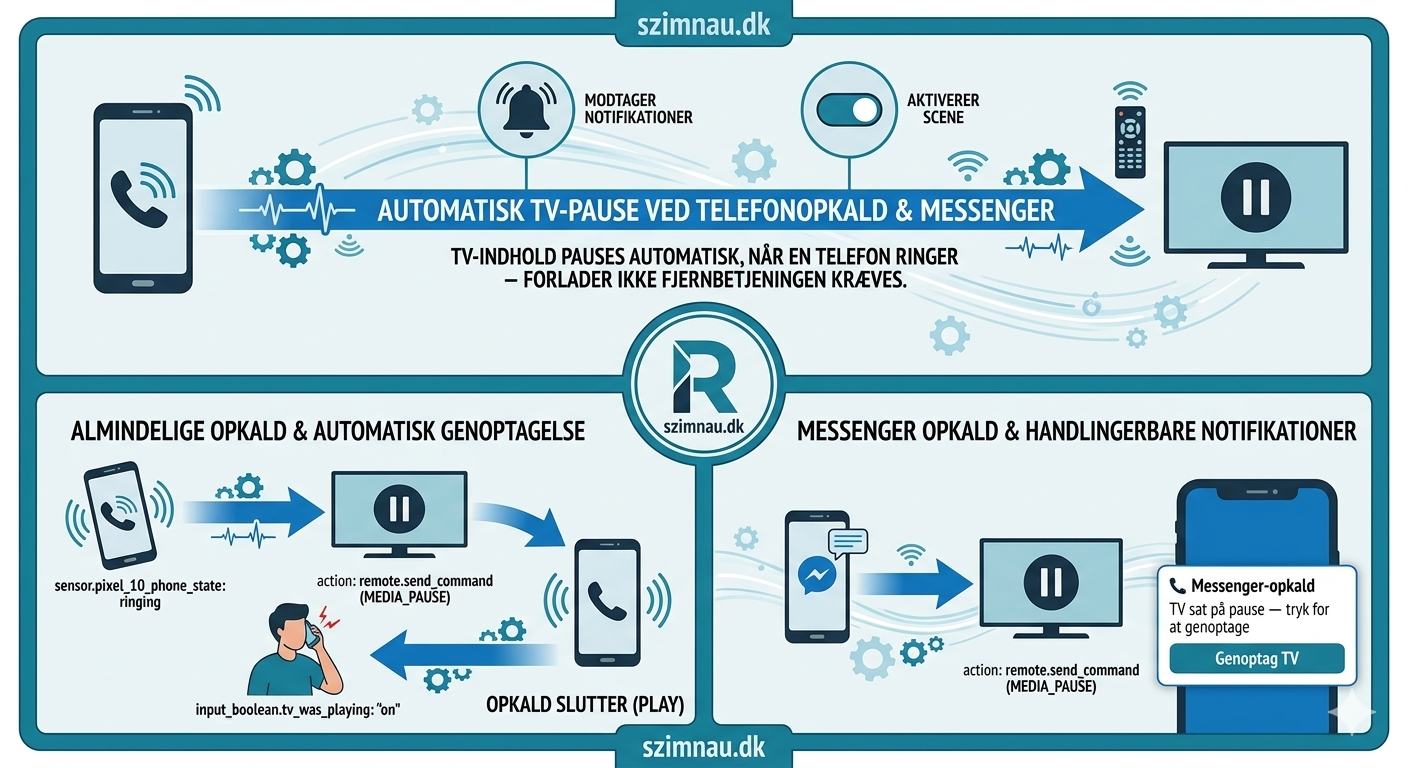
The problem is obvious once you’ve experienced it enough times. Someone calls. You scramble for the remote. You find it under a cushion. You pause the film. You’ve already missed the first sentence of the conversation.
The automation is one condition: if a phone rings and the TV is on, pause it. When the call ends, resume it.
The phone sensor
The HA Companion App (free, Google Play / App Store) exposes sensor.pixel_10_phone_state with four states: ringing, in_call, offhook, idle. Install the app, sign in to your HA instance, and the sensor appears automatically — no extra configuration. The trigger covers all three non-idle states — you want the TV to pause the moment the phone rings, not after you’ve answered.
The TV remote entity (remote.tv_stuen) comes from the Android TV integration — built into HA, add it under Integrations and point it at your TV’s IP. The automation first checks whether the TV remote is actually on. There’s no point sending a pause command to a TV that’s already off or was already paused. input_boolean.tv_was_playing handles the latter — it’s set to on when the automation pauses and checked before resuming. Without it, a call could restart something that was intentionally paused before the call came in.
alias: TV — Pause on phone call
trigger:
  - platform: state
    entity_id: sensor.pixel_10_phone_state
    to: [ringing, in_call, offhook]
    id: phone
condition:
  - condition: state
    entity_id: remote.tv_stuen
    state: "on"
  - condition: state
    entity_id: input_boolean.tv_was_playing
    state: "off"
action:
  - action: input_boolean.turn_on
    target:
      entity_id: input_boolean.tv_was_playing
  - action: remote.send_command
    target:
      entity_id: remote.tv_stuen
    data:
      command: MEDIA_PAUSE
  - wait_for_trigger:
      - platform: state
        entity_id: sensor.pixel_10_phone_state
        to: idle
    timeout: "02:00:00"
    continue_on_timeout: true
  - delay:
      seconds: 2
  - condition: state
    entity_id: input_boolean.tv_was_playing
    state: "on"
  - action: remote.send_command
    target:
      entity_id: remote.tv_stuen
    data:
      command: MEDIA_PLAY
  - action: input_boolean.turn_off
    target:
      entity_id: input_boolean.tv_was_playing
The 2-second delay before resuming is intentional. Without it the play command fires while the call is still technically ending — the phone sensor hits idle a fraction of a second before the call actually drops, and the audio comes back mid-goodbye.
The 2-hour timeout is a safety net. If a call somehow doesn’t register as ended, the automation doesn’t sit waiting forever. continue_on_timeout: true means it resumes regardless after two hours.
Messenger is different
Messenger video calls don’t register in phone_state. They come through as a notification. The companion app exposes sensor.pixel_10_last_notification, and when the state contains “opkald” (call), it’s a Messenger call.
The handling is different because the end of a Messenger call is less reliable to detect. Instead of waiting for the sensor to go idle, it sends an actionable notification with a single button: Resume TV. Tapping it fires the resume immediately. If nobody taps within 30 minutes, the automation continues anyway.
  - choose:
      - conditions:
          - condition: template
            value_template: >
              {{ 'opkald' in (trigger.to_state.state | lower) }}
        sequence:
          - action: remote.send_command
            target:
              entity_id: remote.tv_stuen
            data:
              command: MEDIA_PAUSE
          - action: notify.alle_enheder
            data:
              title: "📞 Messenger call"
              message: "TV paused — tap to resume"
              data:
                actions:
                  - action: tv_resume_after_call
                    title: Resume TV
          - wait_for_trigger:
              - platform: event
                event_type: mobile_app_notification_action
                event_data:
                  action: tv_resume_after_call
              - platform: state
                entity_id: sensor.pixel_10_phone_state
                to: idle
            timeout: "00:30:00"
            continue_on_timeout: true
          - action: remote.send_command
            target:
              entity_id: remote.tv_stuen
            data:
              command: MEDIA_PLAY
The 30-minute timeout on Messenger versus 2 hours on regular calls reflects reality — Messenger video calls rarely last more than half an hour. A regular phone call to a parent might go for an hour and a half.
What this actually solves
The scramble for the remote. That’s it. It sounds small. After a few weeks of not having to do it, you notice how often it used to happen — and how the first thing you did when the call ended was find the remote and un-pause, which is not what you want to be thinking about.
The automation runs silently. There’s no “TV paused” banner unless it’s a Messenger call that needs the manual resume button. Regular calls: it pauses, you talk, it resumes. Nothing to confirm, nothing to tap.